


Five Nights at Freddy's 3 Unblocked
- Horror
- Survival
- Jumpscare
- Strategy
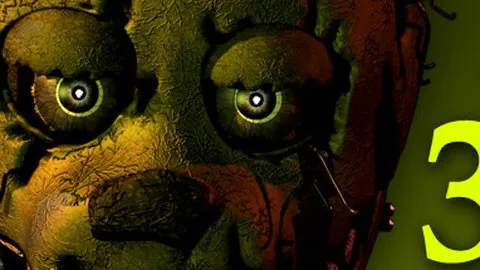
Five Nights at Freddy's 3 is a point-and-click survival horror game by Scott Cawthon, released in 2015, and it strips the office down to a single animatronic with a full ventilation system to fight. The doors and lights from the first two games are gone. In their place is a maintenance layer: a camera feed, an audio feed and a ventilation system, each of which can break independently and each of which has to be rebooted by hand while something walks toward you.
Springtrap is the only real threat in the building. He advances on a timer, takes shortcuts through the vents, and cannot be shut out by any door because there are none. Everything else that appears is a phantom: apparitions that cannot kill you but force you to drop the monitor, break a system, and hand Springtrap the seconds you spent recovering. Night five then removes the systems entirely and puts the two of you in a dark room with only a light and a bed between you.
How to Play Five Nights at Freddy's 3
Two panels sit at the bottom of the screen. The camera panel gives you a numbered feed map and an audio button that plays a voice lure to pull Springtrap toward a neighbouring camera. The ventilation panel gives you a schematic of the whole duct network, where you can select a single vent and shut it, closing off the shortest route to your office. When a system fails you enter the maintenance panel and reboot it by hand, which takes time you do not have.
Game Controls
| Control | Action |
|---|---|
| Move mouse left or right | Pan the office between the left doorway, the right doorway and the centre desk where the panels sit. |
| Click the camera tab | Raise and lower the camera monitor. While it is up Springtrap can still advance, and holding it up is what lets the phantoms force you back down. |
| Click a camera number on the feed map | Switch to that camera. Springtrap can be stalled by viewing his camera, but only while the feed stays up. |
| Click the audio button on the camera panel | Play a recorded voice clip as a lure. Springtrap only hears it from an adjacent camera, and it has no effect at all if he is inside a vent. |
| Click the ventilation tab | Open the duct schematic, a full map of the vent network that replaces the camera map when a vent needs sealing. |
| Click a highlighted vent on the schematic | Select the vent Springtrap is using and close it. The shutter does not seal instantly, which leaves a short window where he can still get through. |
| Click the maintenance tab when a system fails | Enter the error screen and reboot the camera, audio or ventilation system by hand. It cannot be paused and Springtrap keeps moving throughout. |
| Move the mouse left or right during a phantom encounter | Track a phantom across the office so it completes its crossing and leaves, which is the only way to avoid its jumpscare. |
How to Beat Five Nights at Freddy's 3
Use the audio lure the moment he enters a duct
The lure is the only tool that works on Springtrap while he is off camera, and it is useless at exactly the wrong time. Play it before he commits to a vent, from a camera adjacent to wherever he is heading, so that he walks back out to be lured again. Every vent he takes is a shortcut that saves him a large amount of time, so cutting off the duct route is worth more than watching him on camera.
Reboot one system at a time, in a fixed order
Repairs cannot be paused and Springtrap never stops advancing, so the order matters more than the speed. Cameras first, because they are what tells you whether the repair is worth the risk, then ventilation, then audio. Most importantly, do not start a repair while a phantom is walking, because the jumpscare during a repair is what usually ends a run rather than Springtrap himself.
Let the phantoms finish their crossing
A phantom that appears in the office is not trying to kill you. Each one has a simple traversal pattern, and if you move the view to follow it from one side of the room to the other, it completes the crossing and leaves. The jumpscare only happens if you stop tracking it. The cost of a completed crossing is that your monitor goes down and Springtrap gains ground, which is a fair trade against a guaranteed death.
Treat night five as a completely different game
Night five removes the panels, the cameras, the audio and the ventilation, so every habit from nights one to four is useless there. What remains is a dark bedroom, a light, and a figure that moves between the two doorways, the bed and the closet. Hold the light on the doorway he is using, keep the other side closed off by attention rather than by a door, and use the light on the bed and in the closet before you settle down to wait.
Important Items in Five Nights at Freddy's 3
| Item | What it does |
|---|---|
| Camera system | Your only view of Springtrap. It keeps him stationary while you are watching his feed, and a camera failure blinds you completely, forcing the audio lure and the vent map to carry the night on their own. |
| Audio system and voice lure | The counter to Springtrap's vents. A recorded clip pulls him toward the speaker, but it only works from an adjacent camera, and a broken audio system removes the tool entirely. |
| Ventilation system | Both a map of the whole duct network and your one physical defence. Sealing a vent forces Springtrap onto longer routes, and a ventilation failure lets him use the ducts freely while also spawning a fake clone of him on the cameras. |
| Vent shutter | A single closable duct. It does not lock instantly, so sealing it is a timing decision rather than an instant answer, and only one vent can be managed at a time. |
| Maintenance panel | The screen where broken systems are rebooted by hand. Every repair consumes real time while Springtrap closes, which is the central trade of the whole game. |
| Office doorways | Left and right openings with no doors at all. Springtrap waits in one of them and only attacks while the camera or repair screen is up, or while your view is obscured by a ventilation failure. |
| Night 5 flashlight | Available only in the final night, when every system is gone. It is the single tool that keeps the bedroom survivable and the only way to hold off the attacker in the dark. |
Five Nights at Freddy's 3 Difficulty Modes
| Mode | Best for |
|---|---|
| Night 1 | Learning the panels. Springtrap moves slowly, no phantoms appear, and the systems hold without intervention, so the whole night can be spent memorising the vent map. |
| Night 2 | Meeting the phantoms. This is where a system first fails and forces you into the maintenance panel, which is the mechanic the rest of the week is built around. |
| Night 3 | Learning to prioritise repairs. Failures start arriving faster and in combinations, and Springtrap is now active enough that every second spent rebooting is a second he uses. |
| Night 4 | Full pressure. The phantoms appear constantly, the systems break in combinations of two or three at once, and Springtrap's aggression is high enough that a neglected vent map is fatal. |
| Night 5 | The real finale. Every camera, audio and ventilation system is offline, the phantoms are gone, and it becomes a direct encounter in a dark bedroom defended with a flashlight alone. |
Tips and Strategies for Five Nights at Freddy's 3
A ventilation failure fakes Springtrap on the cameras
While ventilation is down, a hallucinated copy of Springtrap appears on the feeds to convince you he is where he is not. It has no effect on the game and cannot harm you, and it vanishes the moment the ventilation is restored. Chasing that image across the cameras is the most common way players hand Springtrap a free run at the office.
Watch the doorway before you trust the monitor
Springtrap waits in one of the two office doorways and will not attack while your view is clear, but he attacks the instant the camera or repair screen comes up. That is the whole trick of the encounter. Before you raise anything, glance at the left and right openings, and if he is standing in one, do not raise the screen until he has moved on.
Do not look at the arcade machine face on camera 4
Phantom Chica appears as a close-up of her face inside the arcade machine, and staring at it triggers her jumpscare. She is one of only two phantoms that punish you for looking rather than for looking away, so on that specific feed you should switch away the moment the image appears, and only switch back once the screen has scrolled past.
Balloon Boy in the third game is a real threat
This version behaves nothing like the one in the second game. He has no movement pattern, he simply appears and blocks a camera, and he jumpscares you if you do not change feeds quickly enough. He can also force the monitor down on his own, which is the most dangerous thing in the game because it does that at the exact moment you are trying to hold a repair.
Five Nights at Freddy's 3 FAQ
How many nights are in Five Nights at Freddy's 3?
Five. Nights one through four follow the same structure of cameras, audio and ventilation, and night five is a separate scenario with every system switched off. The night ends at 6 AM, and completing the fifth night unlocks the post-credits sequence and the arcade minigames that follow the ending.
What are the phantoms and can they kill me?
The phantoms are the apparitions of the original cast: Phantom Freddy, Phantom Chica, Phantom Foxy, Phantom Mangle, Phantom Marionette and Phantom Balloon Boy. Most of them cannot kill you outright. They block a camera, force the monitor down, break one of your systems, or startle you into a jumpscare, and it is those secondary effects that actually end runs.
How do I stop Springtrap from using the vents?
Open the ventilation panel, select the specific vent he is using, and close it. Two things matter. The audio lure has no effect on him while he is inside a duct, so the shutter is the only answer there, and the shutter does not seal instantly, leaving a brief window where he can still come through. Only one vent can be shut at a time, so you have to predict the route.
What is the audio button for?
It plays a recorded voice clip through the speakers to lure Springtrap toward that camera. It only works if he is currently on a camera adjacent to the one playing the clip, and it does nothing at all if he is in a vent or already inside the office. If the audio system breaks, you lose the ability to do this for the rest of the night until you reboot it.
What happens when a system breaks?
You have to go to the maintenance panel and reboot it by hand. Cameras, audio and ventilation can each fail independently, often in combinations of two or three at once on later nights, and the repair cannot be paused while it runs. Springtrap keeps moving the whole time you are working, which makes every repair a decision about whether the system is worth more than the seconds it costs.
How is night five different from the other nights?
Night five removes the entire maintenance layer. There are no cameras, no audio, no ventilation and no panels, and the phantoms do not appear. It becomes a direct encounter in a dark bedroom where you have a flashlight and nothing else, and the attacker moves between the two doorways, the bed and the closet while you track it with the light.
Why does a fake Springtrap appear on the cameras?
It is a hallucination generated while the ventilation system is down, and its only purpose is to convince you he is somewhere he is not. It has no effect on gameplay and cannot harm you, and it disappears as soon as ventilation is restored. The trick is to ignore the cameras entirely while ventilation is out, since the real Springtrap is using the ducts during exactly that window.
Is there a difficulty mode after night five?
Not in this game. Unlike the first two entries there is no Custom Night, so night five is the final scenario and the progression ends with the night itself. The post-credits sequence and the minigames that unlock afterwards are rewards for finishing the week rather than an additional difficulty setting.
Five Nights at Freddy's 3 Gameplay Video
A full gameplay video of Five Nights at Freddy's 3, so you can watch a complete run before you start your own. The player loads from YouTube only when you press play.
More Horror Games
- Five Nights at Freddy's: Sister Location — horror, survival, jumpscare, playable instantly in the browser.
- FNAF World — horror, rpg, exploration, playable instantly in the browser.
- Granny — horror, survival, escape, playable instantly in the browser.